About Adam Young

Once upon a time I was an Army Officer, but that was long ago. Now I work as a Software Engineer. I climb rocks, play saxophone, and spend way too much time in front of a computer.

IPv6 self ping

The simplest test of network connectivity is called ping. A ping message is merely a way for one machine to ask another machine, “Are you alive.” If I want to test the connectivity of my machine to the internet, I will find a machine across the network and ‘ping’ it. While ping will execute if given a domain name (such as adam.younglogic.com) that actually requires a decent bit of protocol magic to translate from that to the associated IPv4 address. Usually, I will use the machine responsible for telling my machine about domain names. These are called name servers. In a Linux system, the name servers are defined by the file /etc/resolv.conf. Someone had something against the letter ‘e’. Thus cat /etc/resolv.conf will get you at least one ipaddress to ping. However, a simpler test is to talk to your default router. This is the place where your workstation/laptop sends all outgoing network traffic.

On my system I can find out this info my typing route -n:

adyoung@adyoung-laptop:~$ route -n
Kernel IP routing table
Destination Gateway Genmask Flags Metric Ref Use Iface
172.16.171.0 0.0.0.0 255.255.255.0 U 0 0 0 vmnet8
172.16.127.0 0.0.0.0 255.255.255.0 U 0 0 0 vmnet1
10.17.124.0 0.0.0.0 255.255.252.0 U 0 0 0 eth0
169.254.0.0 0.0.0.0 255.255.0.0 U 0 0 0 eth1
169.254.0.0 0.0.0.0 255.255.0.0 U 1000 0 0 eth0
0.0.0.0 10.17.127.253 0.0.0.0 UG 0 0 0 eth0
0.0.0.0 0.0.0.0 0.0.0.0 U 1000 0 0 eth1

With the interesting line being:

0.0.0.0 10.17.127.253 0.0.0.0 UG 0 0 0 eth0

This says that anything which matches the mask 0.0.0.0, which is everything, route to 10.17.127.253. So this is where I would start:

$ ping 10.17.127.253
PING 10.17.127.253 (10.17.127.253) 56(84) bytes of data.
64 bytes from 10.17.127.253: icmp_seq=1 ttl=64 time=0.663 ms
64 bytes from 10.17.127.253: icmp_seq=2 ttl=64 time=0.574 ms
64 bytes from 10.17.127.253: icmp_seq=3 ttl=64 time=0.614 ms

— 10.17.127.253 ping statistics —
3 packets transmitted, 3 received, 0% packet loss, time 2000ms
rtt min/avg/max/mdev = 0.574/0.617/0.663/0.036 ms

Note that I hit<ctlr-c> to break it after three responses. Most Linux people that have set up their own networks have to do this type of troubleshooting/testing on a regular basis.

What is the comparable test for IPv6? Well, articles found via a goolge search talk about running ping ipv6, but if I do that I get:

$ ping ipv6
ping: unknown host ipv6

Which tells me the ping program doesn’t know about ipv6 as is. Here is what I eventually found that worked:

ping6 -I eth0 ::1

The ping6 binary seems to be ipv6 aware, where as ping itself is not. I have to tell it explicitly to use a given network interface (ethernet card or port on the motherboard), in this case, eth0.

::1 is the loopback address for networking.

$ /sbin/ifconfig lo
lo Link encap:Local Loopback
inet addr:127.0.0.1 Mask:255.0.0.0
inet6 addr: ::1/128 Scope:Host
UP LOOPBACK RUNNING MTU:16436 Metric:1
RX packets:1106638 errors:0 dropped:0 overruns:0 frame:0
TX packets:1106638 errors:0 dropped:0 overruns:0 carrier:0
collisions:0 txqueuelen:0
RX bytes:220029171 (209.8 MiB) TX bytes:220029171 (209.8 MiB)

IPv6 Default addresses for Ethernet

Last posting I was wondering about the IPv6 Address on my work machine. Seems that there is a scheme for generating an IPv6 address from an ethernet MAC address. From RFC 2426:

The OUI of the Ethernet address (the first three octets) becomes the

company_id of the EUI-64 (the first three octets).  The fourth and

fifth octets of the EUI are set to the fixed value FFFE hexadecimal.

The last three octets of the Ethernet address become the last three

octets of the EUI-64.   The Interface Identifier is then formed from the EUI-64 by

complementing the "Universal/Local" (U/L) bit, which is the next-to-

lowest order bit of the first octet of the EUI-64.  Complementing

this bit will generally change a 0 value to a 1, since an interface's

built-in address is expected to be from a universally administered

address space and hence have a globally unique value.  A universally

administered IEEE 802 address or an EUI-64 is signified by a 0 in the

U/L bit position, while a globally unique IPv6 Interface Identifier

is signified by a 1 in the corresponding position.  For further

discussion on this point, see [AARCH].

For example, the Interface Identifier for an Ethernet interface whose

built-in address is, in hexadecimal,

34-56-78-9A-BC-DE

would be

36-56-78-FF-FE-9A-BC-DE.

OK. For my machine the MAC address is: 00:18:8B:C4:28:4B. The IPv6 address is fe80::218:8bff:fec4:284b/64. Let’s ignore the leading fe80 for now. In IPv6 if a range is all zeros, it can be shorthanded like this ::. Note that this may mean :00:00:00:00:00:, not just :00:. The total number of bits has to add up to 128. The MAC address leads off with 00:18 In hex: The “next to lowest order bit of the first octet” is the equivalent of adding the number 2 to that leading 00, so it would look like this 02:18. In IPv6 we can lead off the leading Zero, and we do see that the IPv6 address starts off with 218. The next two hex digits are 8B in both the MAC address and the IPv6 address. Next we see ff:fe complying with “The fourth and fifth octets of the EUI are set to the fixed value FFFE hexadecimal.” And Both the MAC address and the IPv6 address end with C4:28:4B.

The next Paragraph of the RFC clears up the remainder of the format of the IPv6 address:

   The IPv6 link-local address [AARCH] for an Ethernet interface is
 formed by appending the Interface Identifier, as defined above, to

the prefix FE80::/64.

But what is this /64? From RFC 2373:

The text representation of IPv6 address prefixes is similar to the

   way IPv4 addresses prefixes are written in CIDR notation.  An IPv6

   address prefix is represented by the notation:      ipv6-address/prefix-length

where

ipv6-address    is an IPv6 address in any of the notations listed

                      in section 2.2.

prefix-length   is a decimal value specifying how many of the

                      leftmost contiguous bits of the address comprise

                      the prefix.

So the 64 leftmost bits are the prefix. Since an address in IPv6 is 128 Bits long, that means half is prefix, half is machine specific address. The Right 8 bytes are 02188bff fec4284b, which is the portion converted from the mac address.

So It seems that all Ethernet interfaces get a minimum of one IPv6 address at all times. Any address assigned by DHCP is in addition to this one address. My best guess at this reason is to standardize something like DHCP at the IP level as opposed to Ethernet. DHCP for IPv4 is defined specific to ethernet. If you were using a different architecture, you would have to use a separate protocol. My guess is that Infiniband and other modern networking architectures do something similar. Now one daemon can respond with IPv6 address regardless of the interface type.

Internet Protocol, Version 6

Come June of 2008, all new systems purchased by the government have to support an updated version of the Internet Protocol: version 6, or IPv6 for short. My boss just let me know that I may be heading up an effort to get our software IPv6 compliant. So now I am in research mode learning about IPv6.

A little background is appropriate for the non-network literate. Most computers are now network aware. The vast majority of these use the internet protocol as part of their networking stack. We use the word stack because networking is done in layers. Each layer on a given machine talks with a comparable layer on the remote machine. There is an overly complex model taught in networking classes that divides it into multiple layers, and most people memorize it to pass the test. Few people use it in everyday work. A simplified way to view it is this: Application->TCP->IP->Ethernet. An application is something like a web browser or an email client, but also many internal programs running on your program reporting your every keystroke to Sony or The Department of Homeland Security. This application talks an application networking protocol like Hypertext Tranport (HTTP), Simple Mail Transport (SMTP), file transport (FTP) and so on. This protocol depends on the transmission control protocol (TCP) to make the end to end connection. TCP does a lot of the heavy lifting in keeping the wires of the internet flowing smoothly. This is called congestion control. TCP is built on top of the Internet Protocol. The most important thing IP provides is routing the communication from our machine to the remote machine and back again. Ethernet is the lowest layer most people have to deal with. It covers many things, including the physical hardware in your computer. Any one of these layers can be swapped out. For instance, at a previous company we used a networking hardware layer called Infiniband instead of Ethernet for certain types of network traffic.

The current, ubiquitous standard is IP version 4 (IPv4). Probably the most visible difference between v4 and v6 is the addressing scheme. When you type a request into a web browser like this http://www.younglogic.com, the http refers to the protocol, and the www.younglogic.com refers to a machine name. That machine name is converted by your computer into a machine address. On my machine I can find out the domain name by typing:

host younglogic.com

And I find out:

younglogic.com has address 208.97.174.16

This string of numbers and periods is an IPv4 address. As long as there has been an internet in use by the majority of the public, this has been the way that a computer is identified on the network. It is stored as a base 2 number (as all computer information is stored) using 32 binary digits (bits). for instance, 16 at the end is stored like this: 00010000. An IPv6 address is 128 bits, or twice as many bits long as a IPv4 address.

If I look at the network information for my machine here at work I see this:

eth0 Link encap:Ethernet HWaddr 00:18:8B:81:F8:1E
inet addr:10.17.124.195 Bcast:10.17.127.255 Mask:255.255.252.0
inet6 addr: fe80::218:8bff:fe81:f81e/64 Scope:Link

The HWAddr 00:18:8B:81:F8:1E is unique to the ethernet chip on my computers motherboard. This is called the Media Access Control (MAC) Address and it is supposed to be universally unique. The inet addr field is the dynamically assigned address my machine has been granted from my company dhcp server. The broadcast and mask fields tell me the scope of view my machine has on the local network. I can send network packets out that are broadcast to all machines on my subnet. My subnet is defined by my address logically anded with my netmask. Thus my subnet is 10.17.127.XXX. All machine with an IP address that starts with 10.17, and who third number has the bits set for 127 (64+32+16+8+4+2+1 but not 128 in Binary 00111111) will see that message.

Notice that my machine has an IPv6 address set as well, even though everything I do is IPv4. Why is that? There seems to be an implicit conversion going on from IPv4 to IPv6. I can’t see an obvious translation from my IPv4 address to by IPv6 address, so the best I can guess is that my company assigns both numbers, but perhaps they come from different schemes. More info as I learn.

Here is the thing about IPv6: everything currently assumes IPv4. The simple tools for network troubleshooting like traceroute and ping are both IPv4 by default. The route command does not seem to have options for IPv6, at least according to the man page. It mentions /proc/net/route, and /proc/net/ipv6_route:

A little google magic shows one way to find routing info:

/sbin/ip -6 route show dev eth0
fe80::/64 metric 256 expires 21323624sec mtu 1500 advmss 1440 hoplimit 4294967295
ff00::/8 metric 256 expires 21323624sec mtu 1500 advmss 1440 hoplimit 4294967295

Ah, and it seems route does work when passed -A inet6:

Destination Next Hop Flags Metric Ref Use Iface
::1/128 :: U 0 3 1 lo
fe80::218:8bff:fec4:284b/128 :: U 0 0 1 lo
fe80::250:56ff:fec0:1/128 :: U 0 0 1 lo
fe80::250:56ff:fec0:8/128 :: U 0 0 1 lo
fe80::/64 :: U 256 0 0 eth0
ff00::/8 :: U 256 0 0 eth0
Much to learn here.

Trad climbing…at Rumney

Yes, Rumney. That bastion of sport climbyness, where even the cracks are bolted. Why, you may ask, did I want to trad climb at Rumney? The short answer was, I didn’t. I wanted to trad climb, and my partners were going to Rumney.

For the non climbers reading, trad is short for traditional climbing. Both sport and trad climbing are terms to describe the type of protection the first person in a climbing party, or leader, has to use in order to keep from hitting the ground if they fall. The gear used in traditional style of climbing is designed to be placed and removed by hand. Thus traditional climbs require some weakness in the rock, some crack into which the climber can place a chockstone or a spring loaded camming device. Sport climbing is where the leader clips into bolts with hangers that have been drilled into the wall. Rumney is the prime sport climbing location in New Hampshire. So why would I decide to trad climb there?

Because the protection is easier to place in sport climbing, people sport climb at a higher level than they do trad climbing. The difference comes from the amount of time spent placing gear. In a sport climb, you get within reach of the bolt, you grab a “quick-draw” (two carabiners connected by webbing) off of a gear loop on your harness, clip on ‘biner to the bolt hanger, the other to the rope, and you move on. Contrast this with trad climbing where the first thing you do is decide that you need to place a piece of gear. You examine the rock in your immediate vicinity and decide that there is somewhere possible to place a piece. You select something from a wide array of gear slung around your neck that experience tells you is most likely to fit in the crack in the rock. You slot it in, adjusting how it sets against the side of the crack to best support your weight in a fall. You yank down on it, to tess that it will hold at least that much weight. Then you yank outwards; if you climb up[ past the piece the rope will most likely put a horizontal load on the piece. Once you feel comfortable with the piece, you may decide to extend it (due to the wandering nature of the route you are climbing) with a quick draw. Then you clip it to the rope. If done cleanly, this will take at a minimum a few seconds more than the sport clip. Often, there is additional delays perhaps due to selecting the wrong piece of gear. A climb with the same difficulty rating is significantly harder to trad climb than to sport climb.

I think it is that extra degree of knowledge required to trad climb safely that calls to me. There are better climbers in all aspects of the sport. I will never compete with Chris Sharma, Ron Kauk, John Long, or any of the other rock demigods in any aspect of rock climbing. I am OK with that. If climbing were so important to me, I wouldn’t spend my time in front of a computer programming for a living. When I do get the time to get outside and climb, I like the experience of trad climbing. I prefer choosing where to place gear myself. Ideally, I love long, multi-pitch routes, with great views and few people. It is something like hiking, but a full body experience.

It is funny: I know that bolts are safer. The standard climbing bolt can carry the weight of a car, never-mind the forces generated by a climber in a fall. But I prefer something that I have placed myself. I get a greater piece of mind from something based on my own judgment, placed where I wanted it. Not that every placement I’ve made has been stellar. I’ve moved up above a piece (usually a passive placement) and heard the tink-tink sound of the carabiner hitting the rock as it slides down the rope. But those are infrequent. I’ve taken 25 foot falls onto several of my trad placements. I’ve never had a cam placement that I though was solid pull on me. It is all a question of judgment. I don’t get myself into a situation that I don’t feel I can safely navigate.

I hadn’t been to Rumney since 1992. If Rumney had a sports climbing only reputation back then I hadn’t heard about it. Mike Peloquin, Loren Armstrong, and I spent the day trad climbing at the main wall and had a grand ole time doing so. Thus, I had it in my head that Rumney was trad-climbable, even if its reputation said otherwise. Plus, one benefit to looking for trad routes at a sport climbing crag is that they are more likely to be available. Especially if one is visiting in the middle of the busiest weekend of the season. Once I linked up with my climbing partners, I flailed on a sport climb that would have been bread and butter for me in my prime. Not easy, but certainly within my ability. Due to crowding, we moved to another crag, as Rumney has a series of small cliffs with a dozen or so routes each. We ended up at Waimaia, the name of both the crag and the climb. Just to left of Waimaia the climb was “That Crack”. Needless to say it got my attention.

Climbs in America are rated on the Yosemite Decimal system. A leading number of 1-4 indicate various levels of non-technical climbing. A leading 5 means technical climbing. 5.0 is the easiest technical climbing on the scale.  The scale was originally designed to go from 0 to 9. Then people started blowing the top off the scale an it was extended to 10, with sub ratings of a,b,c, and d. Once someone climbed something harder than 1 5.10d, they extended the scale to 5.11. The pattern continued until today where the hardest climbs are rated 5.15a. The climb I was flailing on was 5.10d. That Crack was rated 5.10a. Easier, but not significantly so. With the difference between trad and sport, I was probably looking at a harder climb. One major thing in my advantage was that I could place gear where ever I wanted providing I had a piece that would fit in the crack. It was a short climb, and I have a fairly thorough rack, so I was confident in my ability.

The climb turned out to be a one move wonder. The bottom and the top were easier than the stated 5.10a. The guide book mentioned that “the chimney is a grovelfest” or something to that ends. A chimney in rock climbing is when you climb between two slabs of rock, using opposing pressure to hold yourself up.  This climb had about a ten foot section of chimney.  The funny thing about chimney climbing is that while most people curse about it, it is in some way the most secure type of climbing.  You are just not going to fall.  It might be really hard to make upward progress, and you may bruise your knees in the process, but there is something  snug and secure about chimney climbing.  That being said, I did not climb the chimney clean. Really, the problem was getting out of the chimney and back to facing the rock.  This is often the trick to chimney climbing, either getting into them or getting out of them.

Afterwards, I lead Waimaia and top roped That Crack again to clean it up.   Later in the day we climbed Darth Vader.  While it was a short route, it was enjoyable.  It was rated 5.9 and had a couple interesting moves at the top.  The route total for the day was 2 trad, 2 sport, 1 top rope.  I also lost and found my keys, wallet, and cell phone.  All in all a good day.

Foot placement in crack climbing

There are two main forms of rock climbing. The most popular is face climbing. The climber makes upward progress for the most by pulling downward on small ledges in the rock with their hands, and stepping on top of these same ledges with their feet. This is the predominant style of climb in climbing gyms as well as sport climbing. The other form of climbing involves cracks in the face of the rock. The techniques involved in navigating a vertical crack in a rock are somewhat different from the more popular face climbing.

I love crack climbing. A crack in the rock about two inches wide, just wide enough to get my hand inside, is thus called a hand crack. If a crack is in the face of a rock, with both sides of the crack flush, it is called a splitter crack. My ideal climb involves serious portions of perfect splitter hand crack.

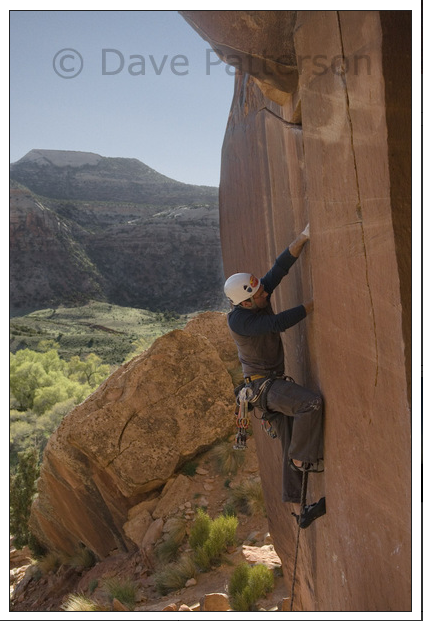
A lot has been written about the placement of hands in hand crack. Less has been written about foot placement. Many people avoid crack climbing due to the painful nature of foot placement in cracks. I suspect I know the reason, and have a technique that will help both minimize the discomfort and maximize the effectiveness of foot placements.

The advice most people get when learning how to place feet is to cam the knee out perpendicular to the crack, so that the sole of the foot is vertical. You place the foot into the crack, and then turn the knee vertical, camming the foot inside the crack. The discomfort most people feet comes from the focus of pressure on the high point behind the big toe.

Contour Map of the Foot

The diagram above is a simplified contour map of the foot. The curved paths represent spots on the top of the foot that are all the same height. The line segment AB represent the edge of the crack when the foot is placed parallel to the ground and perpendicular to the crack. Note how this line goes right over the arch behind the big toe. This is the pain point.

Proper foot placement in crack climbing is based around lining up the contour of the foot with the edge of the crack. The line Segment CD represents the edge of the crack in the preferred approach. Note how it aligns more closely with the major contour that runs along the outside edge of the foot, behind where the toes join. A typical climbing shoe, especially one designed for crack climbing, will have sticky rubber well up to this point. This sticky rubber is much more evenly in contact with the sides of the crack.

Here’s the technique. Rotate the knee out to the side so your foot is vertical. Place your vertical sole in the crack. You should just feel the edge of the crack on the pain point. You are going to use the pain point as the pivot point as you rotate the heel of the foot downward while you straighten your leg. Your foot will cam naturally into the crack, and the pressure will be distributed along the contour line of the top of the foot. As you rotate your foot, straighten your leg as well, and you should be able to place body weight on the newly placed foot.

Dave Patterson’s photo shows Joe Dawson with his left leg in the described position. (Yes, that is Indian Creek, home of some of the greatest splitter cracks you can imagine.) Note that he has his fully body weight on the lower leg, minus the small bit that is loaded on his arms. Note: Dave is a friend.  I got explicit permission to use his photo.  Please do not take it and use elsewhere.

Photo Copyright Dave Patterson, Used With Permission

Photo Copyright Dave Patterson, Used With Permission

cvs to perforce translations

At my current company I have to use perforce.  I’ve used cvs and subversion recently, and I tend to think about revision control in terms of thsose.  So here is my start of a cvs to perforce dictionary.  This post will be edited as I learn more:

The format is

cvs command : perforce command  — comment

  • cvs diff : p4 diff  — hey some things are easy
  • cvs commit : p4 submit  — note that the p4 version tends to be done with a change log
  • cvs commit : p4 resolve —when you submit a file, the server compares the version you checked out to what is in the repo.  If changes have come in since you checked out, perforce will prompt you to merge them by hand.  cvs commit does this automatically, and will report any failures in automatically merging.
  • cvs status : p4 opened  — this shows only the files that are opened but that were already added to the repo. cvs status has a lot more info than this.
  • cvs update : p4 sync
  • cvs blame:  p4 filelog  — not really a direct translation, but a starting point.  filelog is really more like cvs history.

Key perforce commands that have no cvs analogues:

p4 change –creates a change set, a subset of the files in the current directory that will be commited together.   Thus a p4 submit -c <changlist#> could only be reproduced in cvs by somehow generating a list of a files you wanted to revision control together.  CVS does not tend to be used that way.

p4 client — perforce controls everything on a centralized server.  It also requires you to explicitly check out a file before editing.  You must create a client to get any work done.  the p4 client command both creates a client, and allows you to name it. domain dns .

Peregrine Falcons at Russell Crag

Rock Climbing is my major leisure time activity. Given a free weekend, that is what I want to spend my time doing. One thing that excited me about moving back east was the quantity of good, climbable rock in the vicinity of my parents home in the White Mountains of New Hampshire. The house is about halfway between Rumney and Franconia Notch, two of the big three climbing areas in NH. The Third area, North Conway, is at the other end of the Kancamagus Highway. In addition to the numerous established climbing areas, there are vast numbers of smaller, local crags just begging to be climbed. One of these is on Russell Mountain, Just west of Russell Pond Campground, and just North of Exit 31.

Many years ago, after college I was suffering through from EMail. Before internet access was everywhere, most people had to resort to dial-up. I went with AOL. THis was before AL had developed its hard earned reputation for spam, script kiddies, and painful connections. When I was trying to get a screen name, just about every variation on my name had been taken. I setteld on RusselCrag (yes, I missed a letter). Even then I was thinking of home.

I did a little bit of a web search about Russell Crag. Aside from finding a guide service where a guide had claimed to have done first ascents there, there was nothing about climbing. Good. But there was some references to Peregrine falcons. Numerous cliffs in the Sierra’s have part time climbing bans to protect the Raptors that nest on them. The mother birds will often abandon a nest if she feels threatened. If this happens after the eggs are laid, they will not hatch, and another year with no replacement population threatens their already dwindling numbers.

In mid July, a few days after arriving on the East Coast, I took a pair of binoculars and scanned Russell Crag from my folks property. I got lucky. I saw a beautiful brown and white bird of prey launch from the vicinity of the crag, and start riding the rising wind currents west of Russell Mountain. The white band at the neck identified it as a Peregrine. I watched the falcon rise higher, pass after pass, and then disappear behind the mountain.

A few weeks later, I contacted Chris Martin the author of a New Hampshire Audubon study on Peregrin Falcons nesting in New Hampshire. He confirmed that Russell Crag was an active nesting site that year. They had bandded three chicks in June. By July, there was no risk of climbing to threaten the nest. He suspects that the nest will be in use for several years to come. In fact, he invited me along to help with the banding next may if I was interested. I most certainly am.

So if you are in the vicinity of Russell Mountain, search the skies for circling Falcons. If you want to climb Russell Crag, give me a shout and we’ll go up, so long as it isn’t nesting season.

Automount listing

At work we have a slew of directories automounted.  Te problem is that unless you know the name of a subdir under the mount point, you can’t navigate to it.  Since we use nis to list the mount points, you can’t even find a local list to see what is automounted.  However, the init script for autofs shows the way to get the listing.  It is a two step process.  First, use ypcat -k auto.master to see the list of top level mount points.  For each entry there that has a yp: in it, run another ypcat -k to see the actual top level directories:

Here it is in bash:

#!/bin/sh

for MOUNT in `ypcat -k auto.master \
| grep yp | awk ‘{gsub(“yp:”,””,$2) ; print $1 “:” $2  }’`
do
MDIR=`echo $MOUNT | cut -d ‘:’ -f 1`
YPNAME=`echo $MOUNT | cut -d ‘:’ -f 2`
ypcat -k $YPNAME | cut -d ‘ ‘ -f1 | sed “s!^!$MDIR/!”
done

Climbing at Quincy Quarries

One reason we moved to Boston was to be closer to the things we like to do. Yes, the Sierras are great, but at a minimum of 3 hours driving time from the SF Bay Area multiplied by the screaming infant factor, they were just too far away for regular visits.

This weekend was our only our second where we all stayed in the Boston area since we moved here in July. I made plans with some I met via meetup.com’s Boston Rock climbing meetup to climb at quincy quarries on Saturday morning. I had heard about the quarries back before I left the area (I left in 1989) but was not in to climbing then, so I had never made the effort to go. The stories back then were of car break-ins, falling rocks, and kids drownding in the water left in the old quarry holes. website offline I had been assured that the current scene was much more positive. I was pleased to find out that it was so. back link check . After some debate, my wife and I decided that it would be a decent attempt for a family outing, so we packed up the car and drove the 15 minutes south to Quncy.  We met up with Roger, my partner for the day, out on the street.  We both were running a little late, which made for a perfect connection.  The climbing was a one minute walk in on a paved trail.
While there is climbing that close to SF (Glen Park comes to mind) the quarries are a great site. The main area is a large grassy field with cliffs surrounding it.  One portion is quite overhung and makes a decent place to, say, put a stroller containing a sleeping toddler.  The cliffs are short, the tallest in this area was 50 feet.  But then again, that is still taller than even the highest point at most climbing gyms.  Add to that the fact that it is real rock and it makes for an enjoyable climbing experience.

We spent the day at  K wall.  I opened by leading outside corner, a 5.8 with great gear placements all the way up (Although I did clip a fixed piton). Once the rope was up, we pretty much shared ropes with the parties next to us on this climb and the 5.9 next to it.  At the end of the day, we move the rope over one more anchor and beat on what we thougt was a 5.9.  It was, except for the final move which was probably low 11s.  More than I was ready for at that point, even on TR.

The climbers were a great bunch.  Lots of people just getting into the sport that were experienceing “outside” for the first time, mixed with a few old school climbers that showed up solo and just got a ride on the existing topropes. One such old-school climber (Paul) showed a level of gracfulness in his layback approach to the crux move on outside corner, that we had all dyno-ed our way through.   I followed his example on my next attempt.

I managed to abrade the back of my hand on  a hand jam, so I call it a successful day.